Frontend System Design
RADIO Pattern (Autocomplete)
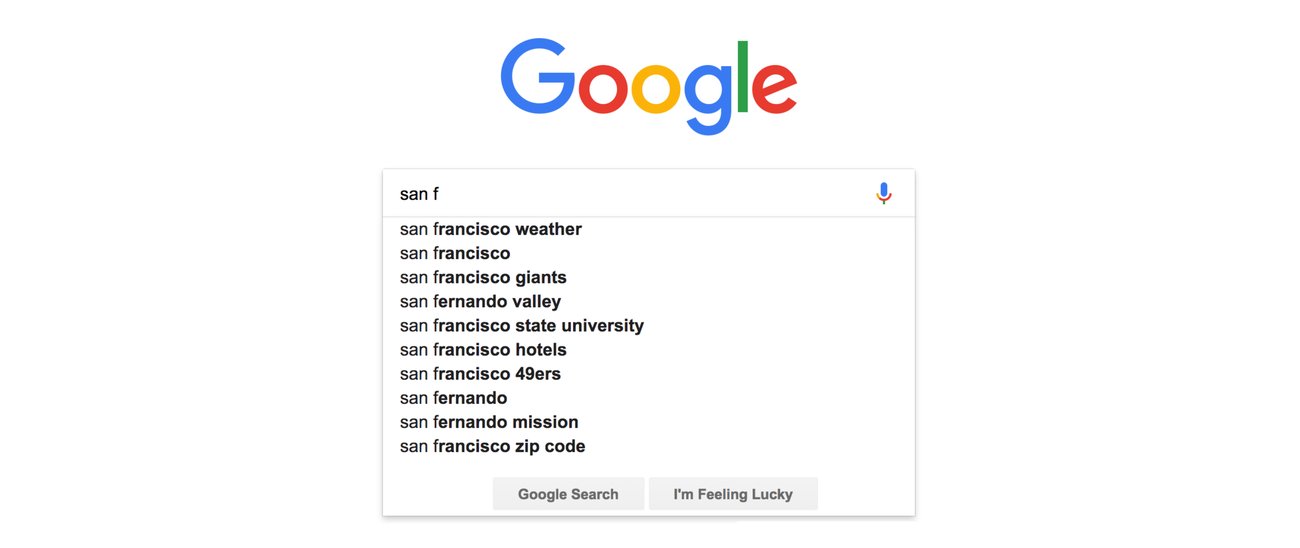
1. Requirements Exploration
Clarify the Problem Scope:
- Primary Goal: To provide real-time, relevant suggestions as the user types in the input field.
- Data Source: Will suggestions be sourced from a local database, external API, or both?
- Pagination Strategy: Determine if results should be paginated or if infinite scrolling is required.
- Display Requirements: Define what should be shown in the suggestions (text, images, icons).
- Error Handling: How should errors be managed (e.g., API failures)?
- Performance Needs: Focus on optimizing the speed and efficiency of fetching suggestions.
- Security: Address any data privacy concerns related to the suggestions.
- Functional Requirements:
- Real-Time Suggestions: Provide suggestions in real-time as the user types.
- Search Functionality: Fetch and display suggestions based on user input.
- Pagination/Scrolling: Support paginated results or infinite scrolling based on user interaction.
- Error Handling: Display appropriate error messages if the API request fails or returns no results.
- Selection Handling: Allow users to select a suggestion from the list and handle the selection event.
- Non-Functional Requirements:
- Performance: Ensure the autocomplete feature is responsive and does not degrade the performance of the application.
- Scalability: Design the system to handle a large number of suggestions and concurrent users efficiently.
- Usability: Ensure the autocomplete component is user-friendly and provides a smooth experience.
- Accessibility: Make sure the component is accessible to users with disabilities, including compatibility with screen readers and keyboard navigation.
- Reliability: Ensure the system handles errors gracefully and remains operational under varying conditions.
- Security: Protect user data and interactions, especially if dealing with sensitive or personal information.
2. Architecture/High-Level Design
Key Components and Their Relationships:
-
UI Component (Autocomplete Box):
- Contains the input field and suggestion list.
- Manages user interactions, including showing suggestions and handling errors.
-
Search Service:
- Handles communication with the backend to fetch suggestions.
- Manages pagination and updates the suggestion list.
-
Cache:
- Stores results for previously fetched queries and offsets.
- Reduces redundant API calls and speeds up response times.
-
State Management:
- Manages the state of user input, suggestions, errors, and loading indicators.
- Connects the UI with the data fetched from the backend.
-
API Layer:
- Defines how the frontend communicates with the backend.
- Handles API requests, including pagination, and manages error responses.
3. Data Model
+-------------------+
|    Query Object   |
+-------------------+
| - query: string   |
| - offset: number  |
| - limit: number   |
+-------------------+
| + SearchService   |
| + APILayer        |
+-------------------+

       ^
       |
       |

+-----------------------+
|  Suggestion Object    |
+-----------------------+
| - id: string          |
| - label: string       |
| - description: string |
| - icon: string        |
+-----------------------+
| + UIComponent         |
| + Cache               |
+-----------------------+

       ^
       |
       |

+------------------------+
|   Error Object         |
+------------------------+
| - errorCode: string    |
| - errorMessage: string |
+------------------------+
| + UIComponent          |
| + APILayer             |
+------------------------+
Data Entities and Their Components:
// Query Object Interface
interface Query {
  query: string;      // The search term entered by the user
  offset: number;     // Pagination offset for fetching results
  limit: number;      // Number of results to return per request
}

// Suggestion Object Interface
interface Suggestion {
  id: string;         // Unique identifier for the suggestion
  label: string;      // The main text of the suggestion
  description?: string; // Optional additional information
  icon?: string;      // Optional image or icon URL
}

// Error Object Interface
interface Error {
  errorCode: string;  // Code representing the type of error
  errorMessage: string; // Description of the error
}
-
Query Object:
- Fields:
query: The search term entered by the user.offset: Pagination offset for fetching results.limit: Number of results to return per request.
- Component: Search Service, API Layer.
- Fields:
-
Suggestion Object:
- Fields:
id: Unique identifier for the suggestion.label: The main text of the suggestion.description: Optional additional information.icon: Optional image or icon URL.
- Component: UI Component, Cache.
- Fields:
-
Error Object:
- Fields:
errorCode: Code representing the type of error.errorMessage: Description of the error.
- Component: UI Component, API Layer.
- Fields:
4. Interface Definition (API)
Define Component Interfaces:
- Fetch Suggestions API:
- Endpoint:
GET /api/suggestions - Functionality: Retrieves suggestions based on the search query.
- Parameters:
query: The search term.offset: Pagination offset (to support infinite scrolling).limit: Number of results to fetch.
- Example Request:
GET /api/suggestions?query=apple&offset=0&limit=10 - Response:
- Endpoint:
{
  "pagination": {
    "size": 10,          // Number of results per page
    "total": 50,         // Total number of results available
    "count": 10,         // Number of results returned in this response
    "per_page": 10,      // Number of results per page
    "next_page_url": "/api/suggestions?query=apple&offset=10&limit=10",  // URL for the next page
    "prev_page_url": null,  // URL for the previous page (null if on the first page)
    "next_cursor": "next_cursor_value",  // Cursor for the next set of results
    "prev_cursor": null  // Cursor for the previous set of results (null if on the first page)
  },
  "results": [
    {
      "id": "1",
      "label": "Apple"
    },
    {
      "id": "2",
      "label": "Apple Pie"
    }
    // ... More results
  ]
}
     ```
   - **Errors:**
     - **404:** No suggestions found.
     - **500:** Internal server error.

2. **Load More API:**
   - **Endpoint:** `GET /api/suggestions`
   - **Functionality:** Fetches additional suggestions for the next page.
   - **Parameters:**
     - `query`: The search term.
     - `offset`: Updated pagination offset.
     - `limit`: Number of results to fetch.
   - **Example Request:**
     ```http
     GET /api/suggestions?query=apple&offset=10&limit=10
     ```
   - **Response:** Same format as Fetch Suggestions API.

## 5. Optimizations and Deep Dive

**Explore Optimization Opportunities:**

1. **Caching:**
   - Cache previous results to minimize redundant API requests and improve performance.
   - Use an in-memory cache with query and offset as keys.

2. **Debouncing:**
   - Implement debouncing to reduce the number of API calls during user input.
   - Example: Delay API requests by 300ms after the user stops typing.

3. **Pagination:**
   - Implement pagination to fetch results in chunks rather than all at once.
   - Example: Load 10 results at a time with a “Load More” button.

4. **Lazy Loading:**
   - Use lazy loading to display results only when needed (e.g., as the user scrolls down).

5. **Prefetching:**
   - Prefetch the next set of results when the user is close to reaching the end of the current list.

6. **Error Handling:**
   - Implement retry logic for failed requests and display user-friendly error messages.

7. **Accessibility:**
   - Ensure that the autocomplete component is accessible to screen readers and other assistive technologies.
   - Use ARIA roles and properties to enhance accessibility.

8. **Performance:**
   - Optimize rendering by updating only the parts of the UI that change.
   - Consider using virtual scrolling for large datasets to enhance performance.

```JavaScript
+---------------------+
|  UI Component       |
|  (Autocomplete Box) |
+----------+----------+
           |
           v
+----------+----------+
|  Search Service     |
+----------+----------+
           |
           v
+----------+----------+
|  Cache              |
+----------+----------+
           |
           v
+----------+----------+
|  API Layer          |
+----------+----------+
           |
           v
+----------+----------+
|  State Management   |
+----------+----------+
           |
           v
+----------+----------+
|  UI Component       |
|  (Autocomplete Box) |
+---------------------+